
Receptionist & automations
The hands-off helpers Zoop is building — an AI receptionist, maintenance reminders, and late-arrival alerts — plus missed-job flagging, which works today.
Zoop is building a set of hands-off automations that work in the background — answering texts when you're busy, reminding you to schedule maintenance, and warning customers when you're running late.
Most of these are coming soon. The settings to turn on the AI receptionist, maintenance reminders, and late-arrival texts aren't available in your account yet — this page previews what's on the way. The one that's live today is missed-job flagging (below).
Want to run your business by chatting — booking jobs, drafting invoices, pulling up a customer from your phone? That part is available now: see Your AI assistant.
AI virtual receptionist (coming soon)
When you're on a job and can't get to your phone, the AI receptionist will reply automatically to customers who text or call your Zoop business number. It introduces itself and answers common questions from a knowledge base you control — your dispatch fee, the services you do and don't offer, and a plain-English service area. It only answers within those guardrails (no invented prices or promises), and you write the short intro message it leads with.
Receptionist conversations will show on the customer's record — open a customer, go to their Timeline tab, and filter to AI sessions.
The receptionist only works on your Zoop business number. Calls and texts to a personal cell aren't affected.
Maintenance reminders (coming soon)
Zoop will prompt you to schedule a follow-up visit after equipment installations — for example after an A/C unit or a water heater — so you don't lose the repeat work. The reminder appears inside Zoop; it won't contact the customer on your behalf.
Late-arrival texts (coming soon)
When a job with a promised arrival window looks like it'll run late, Zoop will be able to text the customer a heads-up automatically. Until this ships, you or your tech send that message by hand from Route manager.
Missed jobs (available now)
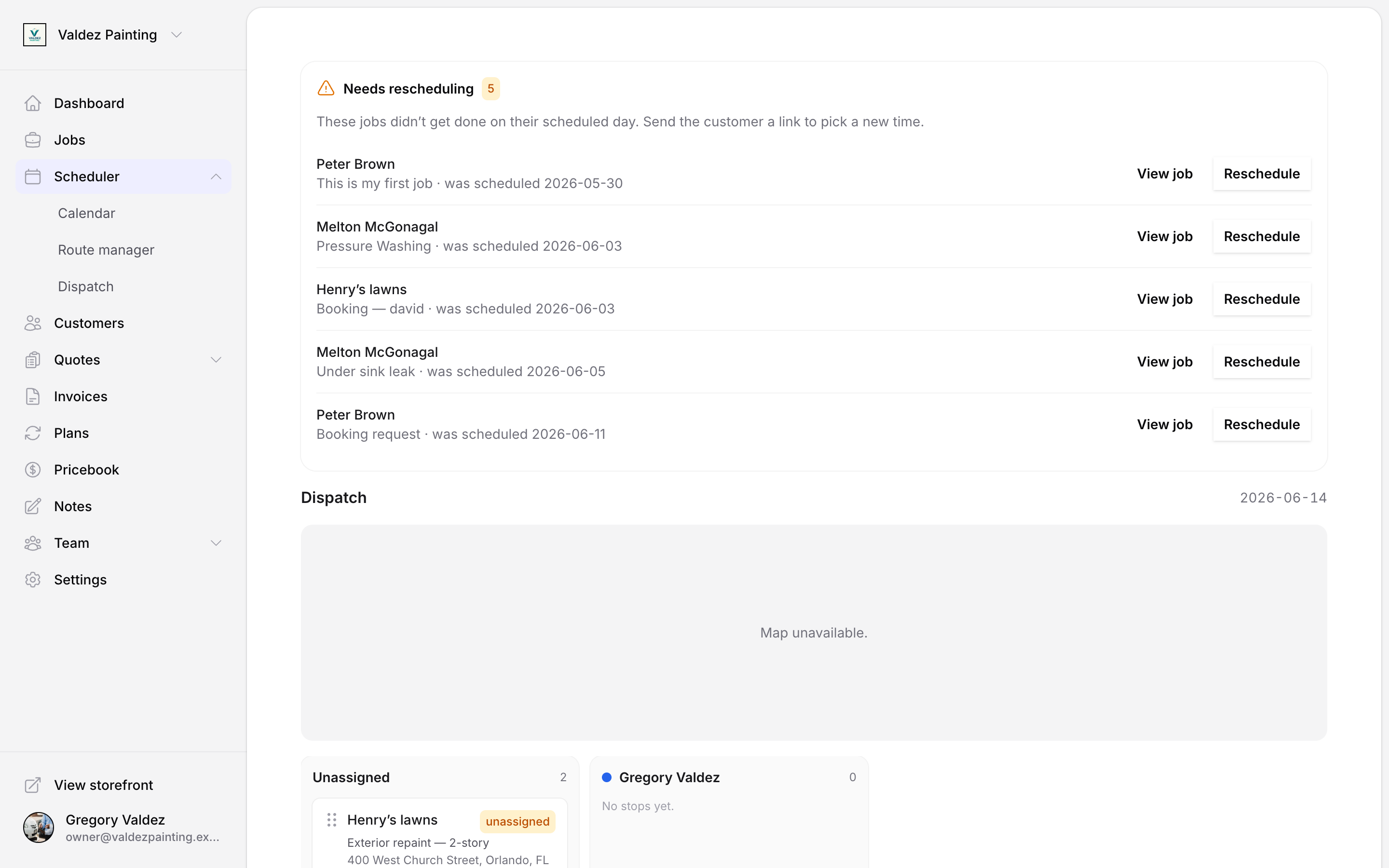
If a job's scheduled day passes without being marked done, Zoop flags it automatically in a Needs rescheduling tray at the top of the dispatch board. From there you generate a reschedule link and send it so the customer can pick a new time. Zoop never moves or reassigns the job on its own — you decide whether and when to send the link.
Run Zoop by chat
Beyond these background automations, you can run your whole business by chatting with Zoop through ChatGPT, Claude, Perplexity, or any AI app — book jobs, draft quotes and invoices, look up a customer, all in plain language.